


GMC Remote Start: How to Use It (Key Fob & myGMC App)
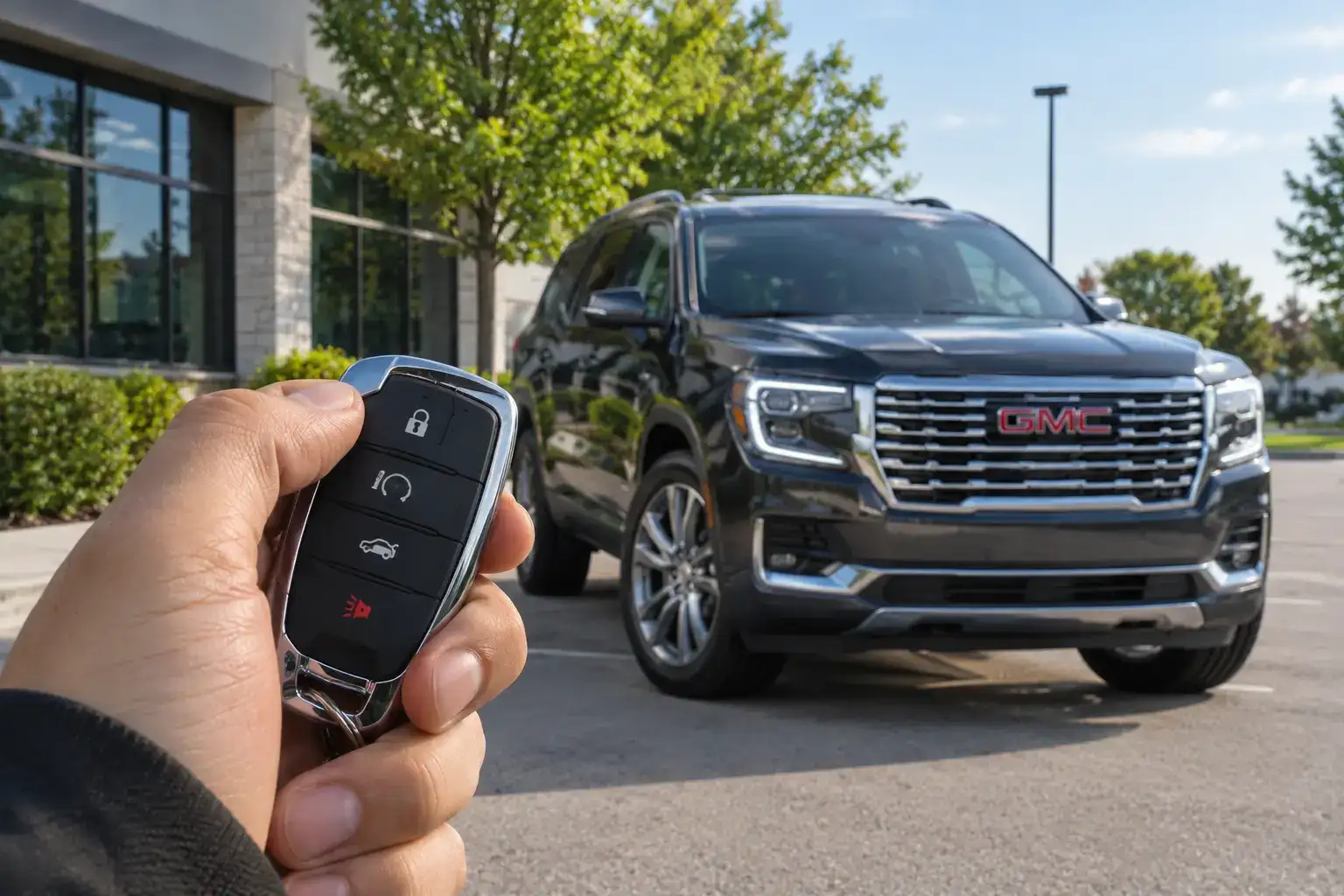
Remote start is one of the most practical features on a modern GMC, and it works in two ways: through the physical key fob that came with your vehicle, and through the myGMC app on your smartphone. On a hot Florida morning when the sun has already been baking your truck for hours, being able to start the engine and get the air conditioning running before you even open the door is a genuine quality-of-life upgrade. This guide walks through both methods step by step, explains how long the engine runs and how to extend it, covers the most common reasons remote start stops working, and tells you which GMC models include the feature.
How to Remote Start a GMC With the Key Fob (Step by Step)
The key fob method is the fastest way to remote start your GMC and requires no phone, no subscription, and no Wi-Fi. The sequence is the same across most GMC trucks and SUVs, though the fob design varies by vehicle and model year.
Standard Key Fob Remote Start Sequence
Find the looping arrow button on your key fob and press it twice. On some vehicles the sequence is different: press and release the Lock button first, then press and hold the looping arrow button until the vehicle starts. The turn signals will flash to confirm the remote start worked. GMC also advises keeping the vehicle locked when remote starting, and never using remote start in an enclosed, unventilated garage.
Once inside the vehicle, insert your key or press the brake pedal and the Start or Power button, as usual to take over engine control. If you attempt to drive without completing this step, the engine will shut off when you shift out of Park. The vehicle does not consider itself fully started for drive purposes until the key is recognized inside the cabin.
What to Know Before You Use It
GMC’s remote start will not activate if the hood is open, the check engine light is on, or the fuel level is too low. The system also requires the vehicle to be in Park. If any of these conditions exist when you press the fob, the hazard lights will flash to indicate the attempt was blocked. This is a safety feature, not a malfunction.
How to Remote Start With the myGMC App (and the Plan You Need)
The myGMC app allows you to remote start your vehicle from anywhere with a cellular connection, not just from key fob range. This is particularly useful in Florida’s summer heat when your truck has been sitting in a parking lot for hours and you want the cabin cooled before you walk out of the store.
What You Need to Use App-Based Remote Start
To use remote start through the myGMC app, your vehicle must be equipped with GMC’s connected services system, which requires an active OnStar and Connected Services plan. The Basic Plan, which comes complimentary with new GMC vehicles for a trial period, includes remote access features. After the trial, continued app-based remote start requires an active subscription. The app is available for iOS and Android and your account must be linked to your Vehicle Identification Number.
How to Start Your GMC From the App
Open the myGMC app and sign in to your account. Select your vehicle from the home screen if you have more than one registered. Tap the Remote Start icon, which looks like an engine or starter symbol. Confirm the action when prompted. The app will send the command to your vehicle via the OnStar cellular network and you will receive a confirmation notification when the engine starts. The process typically takes ten to thirty seconds depending on cellular signal strength at the vehicle’s location.
You can also use the myGMC app to set the cabin temperature before starting, on vehicles with that feature, so the system knows whether to run the air conditioning, heat, or defrost when the engine comes on. This is particularly useful on cold mornings when you want heat rather than AC, or when you want to run the defrost to clear fog from the windows.
How Long Remote Start Runs & How to Extend It
On current GMC vehicles, remote start runs the engine for 20 minutes before shutting off automatically, and the system allows up to 40 minutes of total remote-start time. Once you reach that total, you have to start the vehicle normally and turn it off before remote start will work again. In extreme Florida heat, a full cycle is often what it takes to bring interior temperatures down, particularly after the vehicle has been sitting in direct sun.
Many earlier GMC vehicles work differently: they run for 10 minutes and allow a single 10-minute extension by repeating the fob sequence before the first cycle ends, for 20 minutes total. Because this varies by model year, the Remote Vehicle Start section of your owner’s manual is the authority for your specific vehicle. Through the myGMC app you can send a new start command when a cycle expires, within the same total-time limit.
The engine will also shut off if the vehicle’s hood is opened, if the ignition is turned on without the proper key present, or if the oil pressure drops below a safe threshold. These are safety protections built into the system, not glitches.
GMC Remote Start Not Working? Common Causes & Fixes
Remote start failures fall into a handful of predictable categories. Before concluding the system is broken, run through this checklist.
| Issue | Likely Cause | Fix |
| Hazard lights flash once, no start | Hood open, CEL on, low fuel, not in Park | Check all four conditions before trying again |
| Key fob has no response at all | Dead fob battery | Replace the CR2032 coin cell battery in the fob |
| App command sent but no start | Poor cellular signal at vehicle location | Wait and retry; check app for error message |
| Engine starts then immediately stops | Key not detected inside cabin on entry | Take over with key/start button before driving |
| Remote start worked once, now stopped | Subscription lapsed (app method) | Check OnStar account status in myGMC app |
| Fob too close to metal surfaces | RF interference blocking fob signal | Move away from metal surfaces and retry |
If none of the above applies and remote start consistently fails, the most likely culprit is a stored diagnostic trouble code that the system has flagged. A check engine light does not have to be visible to the driver to block remote start in some configurations. Your Starling GMC St. Cloud service advisor can scan for codes and identify whether a stored fault is preventing the system from operating.
Which GMC Models Come With Remote Start
Remote start availability varies by trim level and model year. For most GMC trucks and SUVs, remote start through the key fob is included on mid-trim levels and above. App-based remote start through myGMC requires connected services.
| Model | Key Fob Remote Start | App Remote Start |
| Sierra 1500 (SLE and above) | Standard | With OnStar subscription |
| Sierra 1500 (Pro trim) | Not standard | Not available |
| Sierra HD 2500 / 3500 | Standard on SLE+ | With OnStar subscription |
| Terrain (Elevation and above) | Standard | With connected services |
| Acadia (Elevation and above) | Standard | With connected services |
| Yukon / Yukon XL (Elevation and above) | Standard | With connected services |
| Canyon (Elevation and above) | Standard | With OnStar subscription |
| Sierra EV / Hummer EV | App only (no fob start) | Standard with the included connected services plan |
On GMC electric vehicles including the Sierra EV and Hummer EV, the remote start concept works differently. These vehicles do not have a combustion engine to start, but they do have a cabin preconditioning feature that activates the climate control and brings the battery to an optimal temperature before you get in. This is controlled through the myGMC app and functions similarly to remote start from a comfort standpoint, though the terminology differs.
If you are unsure whether your specific GMC trim includes remote start, your window sticker and the original sales documentation will list it under standard or available equipment. Your Starling GMC St. Cloud team can also look up your VIN and confirm exactly what features your vehicle has.
Remote Start and Climate Control: Making the Most of It in Florida
In Central Florida, where summer temperatures can push the interior of a parked vehicle above 130 degrees Fahrenheit within an hour of being in direct sun, remote start is not a luxury, it is a practical tool for making your vehicle safe and comfortable to enter. Here are a few habits that help you get the most from the feature in Florida conditions.
Set your climate controls before you exit the vehicle. Whatever settings you leave the HVAC system at when you turn off the engine are the settings it will resume when remote started. For summer driving, leave the system in auto mode at your preferred temperature, set the fan to maximum, and ensure the air is set to recirculate rather than pulling in outside air. When the engine remote starts, the system immediately begins cooling the cabin from those settings.
Use the myGMC app to start the vehicle ten to fifteen minutes before you plan to leave, rather than the standard five minutes you might use during a mild season. Florida heat requires more time to fully reduce cabin temperature, particularly for dark-colored interiors and vehicles parked in direct sun. Starting earlier gives the AC time to work through the full cabin, not just the front seats.
For GMC owners who park outdoors at work and return to an extremely hot vehicle in the afternoon, the app-based remote start is particularly valuable because you can initiate the cool-down cycle from inside the building without walking to the parking lot first. By the time you reach your truck, the cabin will already be approaching a comfortable temperature.
There is also a safety dimension to this habit in Florida. Entering a vehicle that has been sitting in direct sun at 130 or higher degrees is a heat exposure risk, particularly for children, elderly passengers, and pets. The National Highway Traffic Safety Administration notes that vehicle interiors can reach dangerous temperatures within minutes of parking on a hot day. Remote starting the vehicle and allowing it to cool before anyone enters reduces that risk meaningfully. It also extends the life of your interior materials: dashboard plastics, leather, and vinyl crack and fade faster when subjected to extreme heat cycles repeatedly. Keeping the cabin cooler with regular remote start use is a low-effort way to preserve your GMC’s interior condition over the years you own it.
Activate or Service Remote Start at Starling GMC St. Cloud
If your GMC came with remote start but you have never activated the myGMC app, or if your OnStar subscription has lapsed and you want to restore app-based functionality, the Starling GMC St. Cloud team can walk you through the activation process. We can also diagnose remote start issues through our service department, connect your vehicle to our diagnostic system, and identify any stored codes that may be preventing the feature from working.
Stop by or give us a call to schedule a service appointment. Remote start diagnostics are typically quick, and in most cases the solution involves a straightforward software check, a fob battery replacement, or an account reactivation rather than any hardware repair.
Conclusion
GMC’s remote start system gives you two reliable paths to a cooled or warmed vehicle before you step outside: the key fob for quick, short-range activation, and the myGMC app for full-distance control anywhere you have a cellular signal. In Florida’s climate, where interior temperatures can exceed 130 degrees after an hour in the sun, this feature goes from a convenience to a genuine health and comfort necessity. Knowing the correct key fob sequence, understanding what blocks the system, and keeping your OnStar subscription active for app control are the three things that keep remote start working reliably every time you need it.
Frequently Asked Questions
Does GMC remote start work if the check engine light is on?
No. A check engine light, whether it is currently visible to the driver or stored as a pending code, will block the remote start system as a safety measure. The vehicle needs to be in a diagnostic clear state before remote start will activate.
Can I remote start my GMC without an OnStar subscription?
Yes, through the key fob. Fob-based remote start does not require any subscription. App-based remote start through myGMC requires an active OnStar and Connected Services plan.
How do I know if my GMC key fob has a remote start button?
Look for a circular arrow icon on the fob. If it is not present, your trim level may not include remote start, or your vehicle may have a different activation method. Check your owner’s manual or contact Starling GMC St. Cloud with your VIN for confirmation.
Can I run the AC while remote started?
Yes. The climate control runs according to the last settings you had when you turned the engine off. If the AC was set to auto or a specific temperature, it will resume at those settings when the engine starts remotely. On compatible vehicles, you can set the target temperature in the myGMC app before sending the start command.

0 comment(s) so far on GMC Remote Start: How to Use It (Key Fob & myGMC App)